Active Front Shutter EL

  •  
  • Thread starterToad330e
  • Start date
T
Toad330e
New member
Joined
02.01.2026
Messages
4
Reaction score
2
I recently replaced the front active shutter system/grille due to damage. I kept the original motor and it works great, opens and closes without grinding etc.
A few days later my check engine light (CEL) came on due to the upper stop not being recognized. I cleared the error codes and the problem went away for a while, but then came back. I'm not sure if the motor needs to be calibrated after reinstallation or how to fix it. If so, any ideas on how to do this?

This is a DTC error code:

Code:
DME_BAC2 - DIGITAL MOTOR ELECTRONICS
138803: Radiator blind, top: upper stop not detected

I have BimmerUtility for Windows and BimmerCode for Android installed, but I'm not sure if either of these programs can help me other than temporarily remove the code.
 
  • Like [+1]
Reactions:d3lfin
In this case, I would advise you to follow the procedure described in the BMW TIS manual available on the ISTA platform for your model. This way, you can find out if you missed anything when replacing the part.

If you can provide your vehicle's model or VIN, I may be able to locate these documents and share them with you if you don't have an ISTA. It would be helpful if you could also include the part number(s) or reference to the part(s) you replaced it with.
 
  • Like [+1]
Reactions:Toad330e
Thanks! I can't get ISTA to work. I get an error when I try to connect.
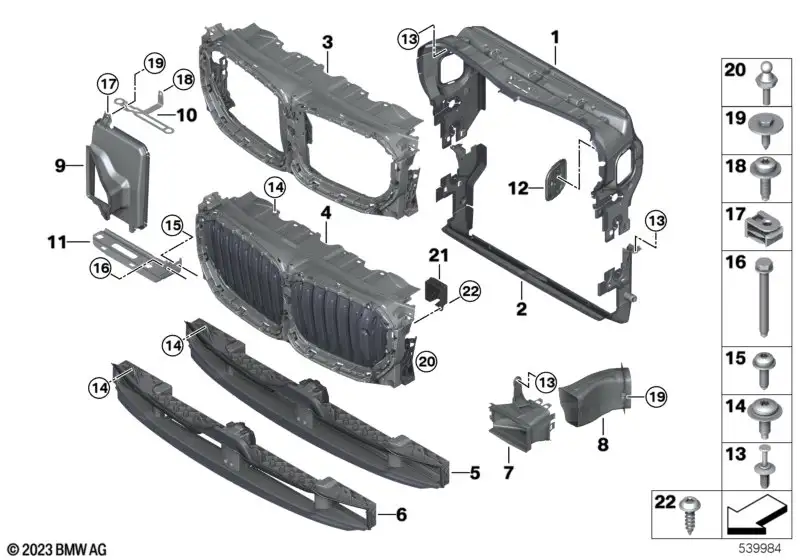
My car is a 2023 BMW X5 sDrive40i, 11.2022. Part of it is an active air duct located behind the upper grille (51-74-5-A29-C42/51-74-5-A29-C44).
I would be very grateful for any help.
 
Based on this original number, the part you are talking about should be number 4:

diag_bknk
Unfortunately, it looks like replacing this part will also require testing/calibration with ISTA+.
Since your car is newer than mine, I will need a newer version of ISTA+ to get more detailed information.
 
  • Like [+1]
Reactions:MasEkapses and Toad330e
Regarding the problem with connecting to ISTA+, could you please let me know:

  • Which version did you install?
  • Did you also install the BMW Standard Tools?
  • What cable/interface are you using?

Regardless of whether you can connect to the car or not, note that you can also operate ISTA+ in offline mode. Therefore, you can also try to find the installation procedures described above by following the steps below:

  • Open ISTA and go to the "Operations" section.
  • Enter your VIN number or select the model/year of manufacture.
  • Go to the "Vehicle management" section.
  • A list of groups will be displayed. The document you are looking for should be in the section "51 Vehicle trim (or Body equimpent) > 11 Front bumber (11)".
  • Click "Start Search". A list of all relevant documents will be provided. You should see a document of type "REP" with a title such as "Replacing the air flap control".
  • Open the document and look for references to procedures with a title such as "control unit programming/coding". This should be one of the final, if not the last, stages.

Hope this helps!
 
Thanks a lot for your help, ucmb!
I have ISTA+ 4.39.20 installed. I use the ENET cable, which is suitable for other operations, such as coding.
When manually entering the VIN code, an error appears: "The VIN enter is not valid and/or not assigned."
I think that although my car's release date is November 2022, that's the last available date in the "Model year" and "Model month" sections of the basic features, so the software is probably too out of date.
Do you think a newer software version will allow the connection? I was able to install the part and it works as expected, but it seems like it needs to be calibrated to fix the Check Engine light.
 
  • Like [+1]
Reactions:ucmb
You are right, ENET is a good choice if you plan to do coding related operations.
Regarding the VIN code and the error that occurs, please note that you may need to provide not the entire VIN code, but only a part of it. In the version of ISTA+ I use, if my VIN is WMWRE01234TD56789, I only enter TD56789.

Assuming you are entering a valid VIN, you can determine if your version supports your vehicle if you can find it in the list manually (without using the VIN). According to this theory, ISTA+ version (4.39.20) supports cars produced since the end of 2022, so your car (produced in November 2022) should also be "supported".

If your vehicle is supported, check that ISTA+ is configured to use the ENET interface. I don't think updating the software version will resolve the connection issue if your vehicle is supported.

Finally, I think you are right about the calibration, but to be 100% sure and understand how to proceed further with coding (if applicable), look up the procedure for replacing this part in ISTA+.
 
I was able to identify the problem. Since none of the VINs worked, I searched for information about the error on Google. I found that installing Visual C+ v14 x64 and x86 directly from the Microsoft website solved the problem. Even without restarting ISTA+, I was able to load vehicle information. The test plan now works. Thanks for all the help in identifying a way to troubleshoot the software!
 
  • Love
Reactions:ucmb

Similar threads

L
  • Locked
  • Lamba
  • Cars and vans
2
Replies
13
Views
2K
Lamba
L
S
  • SvOzMaS
  • Cars and vans
Replies
8
Views
834
boonyen
B
legis_clc180
  • legis_clc180
  • Cars and vans
Replies
6
Views
395
legis_clc180
legis_clc180
Back
Top Bottom