How to Disable the ECO Start/Stop Function on the W213?

  •  
  • Thread startermacbogdan
  • Start date
M
macbogdan
New member
Joined
22.04.2024
Messages
6
Reaction score
48
Can anyone tell me how to disable the ECO Start/Stop function using DTS Monaco? I have a 2017 Mercedes S213.
 
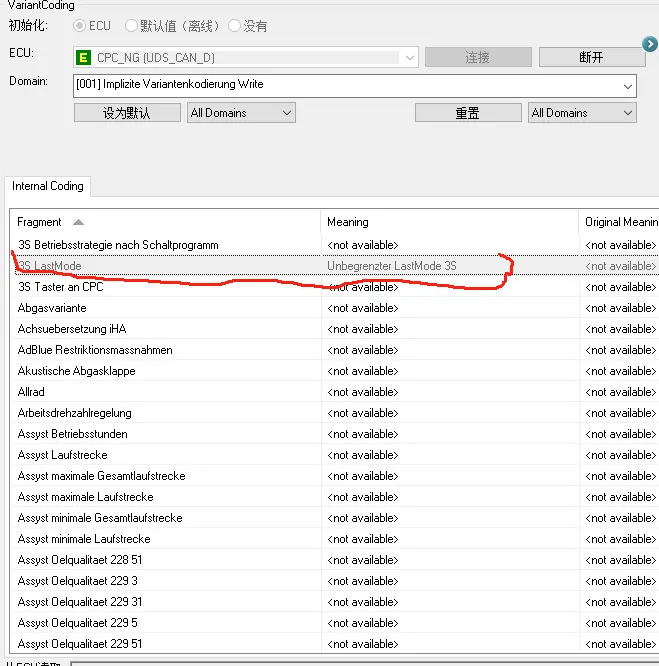
Simply code Last Mode in CPC_NG to 100% operation for 213 and 257.
 
  • Like [+1]
Reactions:underpower
I tried to do this with Launch and the Last Mode code, but it didn't work. After restarting the car, the ECO mode, although it was "OFF", went back to the "ON" state. Is it possible to do this through Launch?
 
I don't have any experience with Launch, but it should be the same as in DTS Monaco.
You may need to unlock the EZS unit first before coding will be accepted.
In any case, I suggest you do it with DTS Monaco.
 
First, check if you have CPC or CPC_NG.
Attach the car scan log.
 
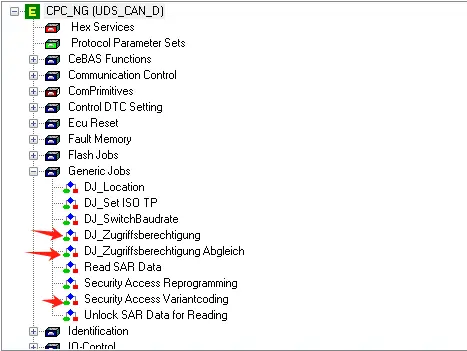
You need to unlock the module in DTS Monaco. You'll need a Seed Key Calculator. Otherwise, it won't let you change it. CPC_NG.
 
Unlock EZS. Then CPC.
 
I have a Launch Pad and you can code some ECUs for the Last Mode but it doesn't work for me.
What ECU do you have?
 
1
2
Unlock CPC_NG.
Code "3S LastMode".
 
  • Like [+1]
Reactions:Hzr, sene, bmm-71 and 2 others
Launch can't do this. This procedure also requires a Seed Key Calculator.
 

Similar threads

A
  • auk
  • Cars and vans
Replies
7
Views
456
keystone
K
J
  • jongdu
  • Cars and vans
Replies
1
Views
695
aammjj31
A
I
Replies
1
Views
151
Dekkaaa
Dekkaaa
Back
Top Bottom